


 178
178
Here we are going to cover a couple different communication error codes in the fujitsu VRF systems.
Remember : Proper wiring design and practice will eliminate this issue. Please ask the questions!
Looping of communication wire path will also cause issues.
Error : 14.5 - Indoor Unit Shortage
This code basically is saying I used to see "x" number of units, now I only see "y" number of units.
Potential issues:
-Unit is turned off
-Unit does not have 240V to it
-Pink wire is disconnected or loose
-Communication board in unit is loose; make sure all connections are tight
-Bad Communication board
If this error persists then, shut down indoor units and then go to the outdoor unit and perform the F3:41 function. This makes the outdoor unit forget what it has connected for indoor units. Cycle power and then start all units again
Error: 14.3 and 14.1 - Indoor Network Communication Error
This code is saying that the system cannot talk properly over network
Potential Issues:
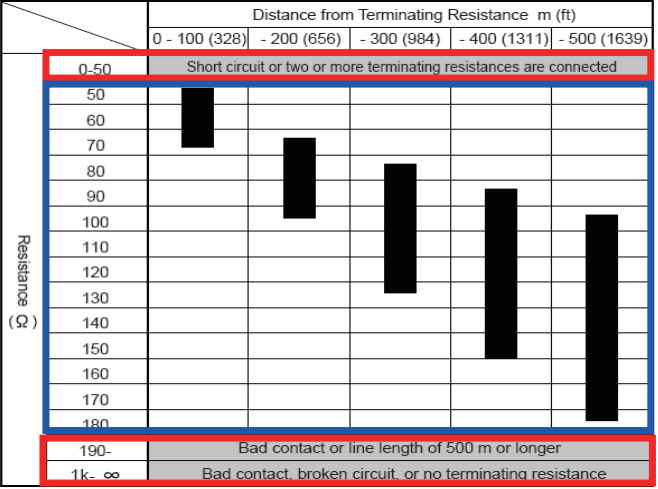
-Wiring is beyond ohm range based on pink wire length in system. Typical systems should be 46-70 ohms
-Wiring is shorted together ( Low Ohms , less that 46 ohms)
-Wiring is disconnected somewhere in system
-Units could be off somewhere in the circuit
-Loose connectors or communication boards in the indoor units
-Terminal resistor not properly set. One Terminal resistor on per network segment. This is found at dip switch Set 5, switch #4. Needs to be on or depending on system.
Error: 14.2 Outdoor Unit Network Communication Error
This code is saying that the system is not seeing the outdoor unit.
Potential Issues:
-Outdoor unit is turned off
-Wrong voltage to outdoor unit
-Pink wire on x1 , x2 and z1, z2 not connected properly
-Loose connectors or communication on outdoor unit board.
See Below For Proper Wiring:
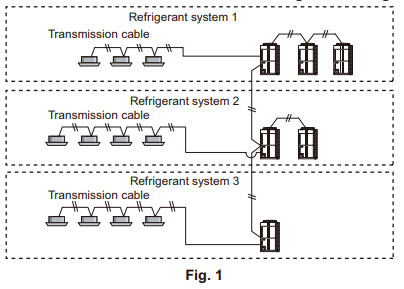
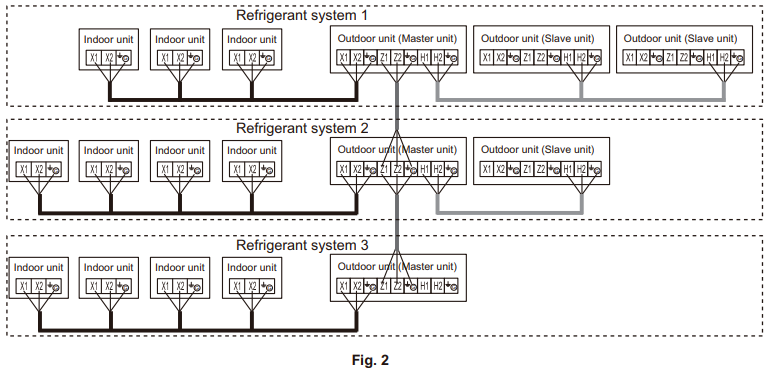
Design Simulator, available for free, will also map out network wiring. Try to follow specified design.
Error: 12.1 - Wired Remote Control Error
Potential Issues:
-Bad Controller
-Bad Communication PCB
-Loose Wiring
-Wrong Control (incompatible control)- All new VRF indoor units use a 2 wire Fujitsu Thermostat. UTY-RNRUZ5 , UTY-RVRU , UTY-RSRY
Controllers use a 12 Vdc signal from control board. If there is not 12vdc on the 2 wire then bad board. If there is 12vdc on the 2 wire bad controller.
Other Issues:
You may not be able to get the right number of units when performing the run check function. This again will be trying to find the out where the disconnect is happening. The thing with this is that you can do a scan with service and you could also do address checker and see the units. I have found that the best way to track down the issues is moving service tool to different parts of the system and then watch for the data to randomly drop out. Then you will have an idea where to look next.

