


Below are a few tests to make sure the Honeywell dehumidifiers are working like they should. The PDFs for files are attached.
| Problem | Troubleshooting Steps/Possible Causes of Issue | |||||||||||||||||||||||||||||||||||||||||||||||||||||||||||||||||||||||||||
| Neither the dehumidifier fan nor compressor run when the control is calling for dehumidification. |
1. Verify the drain line is not clogged. An internal float switch can lock out the dehumidifier if the drain line gets clogged. 2. Wait 5 minutes from the time you made the call for dehumidity. Series 2 versions of the DR90 and DR120 have a 2-5 minute compressor protection delay. If the control is digital, it may also have a delay. These delays will overlap, so if the humidity control has been calling for over 5 minutes and power has not cycled, the dehumidifier should run. |
|||||||||||||||||||||||||||||||||||||||||||||||||||||||||||||||||||||||||||
| 3. If it does not run after the delay, install a jumper between the R and DHUM terminals on the dehumidifier. This bypasses the control circuit. If the unit runs, the issue was with the control or wires to the control. | ||||||||||||||||||||||||||||||||||||||||||||||||||||||||||||||||||||||||||||
| 4. If the unit still does not run within 5 minutes of installing a jumper from R to DEHUM, verify voltage to the outlet that the dehumidifier is plugged into. This should be 120 VAC nominal and if it drops below 102 VAC or above 132 VAC, the dehumidifier will not run. | ||||||||||||||||||||||||||||||||||||||||||||||||||||||||||||||||||||||||||||
| The dehumidifier fan runs but the compressor does not when the con- trol is calling for dehumidification. | If there is a wire to “FAN” on the dehumidifier, remove that wire and see if the dehu- midifier fan continues to run. If the fan shuts off, then whatever is controlling the fan was calling for ventilation. That doesn’t mean a control is calling for dehumidity. Follow the steps from the first issue for further testing. If there is no wire to the “FAN” terminal and the dehumidifier FAN is running but the compressor is not, the dehumidifier may be running in defrost. |
|||||||||||||||||||||||||||||||||||||||||||||||||||||||||||||||||||||||||||
| Troubleshooting (continued) | ||||||||||||||||||||||||||||||||||||||||||||||||||||||||||||||||||||||||||||
| Problem | Troubleshooting Steps/Possible Causes of Issue | |||||||||||||||||||||||||||||||||||||||||||||||||||||||||||||||||||||||||||
| Fan runs when there is a call for dehumidification and the ventilation control is OFF, but the compressor cycles on and off too frequently. | 1. Low ambient temperature and/or humidity causing unit to cycle through defrost mode. 2. Defective compressor overload. 3. Defective compressor. 4. Defrost thermostat defective. 5. Dirty air filter(s) or airflow restricted. 6. Low refrigerant charge, causing defrost control to cycle. 7. Bad connection in compressor circuit. Fan does not run with fan switch in either position |
|||||||||||||||||||||||||||||||||||||||||||||||||||||||||||||||||||||||||||
| Fan does not run with ventilation activated. Compressor runs briefly but cycles on & off with humidity control turned to ON. |
1. Loose connection in fan circuit. 2. Obstruction prevents fan rotation. 3. Defective fan. 4. Defective fan relay. 5. Defective fan capacitor. |
|||||||||||||||||||||||||||||||||||||||||||||||||||||||||||||||||||||||||||
| Evaporator coil frosted continuously, low de-humidifying capacity. |
1. Defrost thermostat loose or defective. 2. Low refrigerant charge. 3. Dirty air filter(s) or airflow restricted. |
|||||||||||||||||||||||||||||||||||||||||||||||||||||||||||||||||||||||||||
| Unit not providing ventilation. | 1. Check control wire connections (check connections at fresh air damper also). 2. Defective fresh air damper. 3. Dirty air intake. Clean outside intake hood. |
|||||||||||||||||||||||||||||||||||||||||||||||||||||||||||||||||||||||||||
| Unit removes some water, but not as much as expected. | 1. Air temperature and/or humidity have dropped. 2. Humidity meter and or thermometer used are out of calibration. 3. Unit has entered defrost cycle. 4. Dirty air filter. 5. Defective defrost thermostat. 6. Low refrigerant charge. 7. Air leak such as loose cover or ducting leaks. 8. Defective compressor. 9. Restrictive ducting. 10. Optional Condensate Pump Safety Switch open. |
|||||||||||||||||||||||||||||||||||||||||||||||||||||||||||||||||||||||||||
| Unit Test to determine problem: | 1. Detach field control wiring connections from main unit. 2. Connect the R and FAN contacts from the main unit together; only the impeller fan should run. Disconnect the wires. 3. Connect the R and DHUM contacts from the main unit together; the compressor and impeller fan should run. 4. If these tests work, the main unit is working properly. You should check the control panel and field control wiring for problems next. 5. Remove the control panel from the mounting box and detach it from the field installed control wiring. Connect the blue, yellow, and green wires from the control panel directly to the corresponding colored pigtails on the main unit. Leave the violet, white, and red wires disconnected! 6. Turn on the humidity control. The compressor and impeller fan should run. 7. If these tests work, the problem is most likely in the field control wiring. |
|||||||||||||||||||||||||||||||||||||||||||||||||||||||||||||||||||||||||||
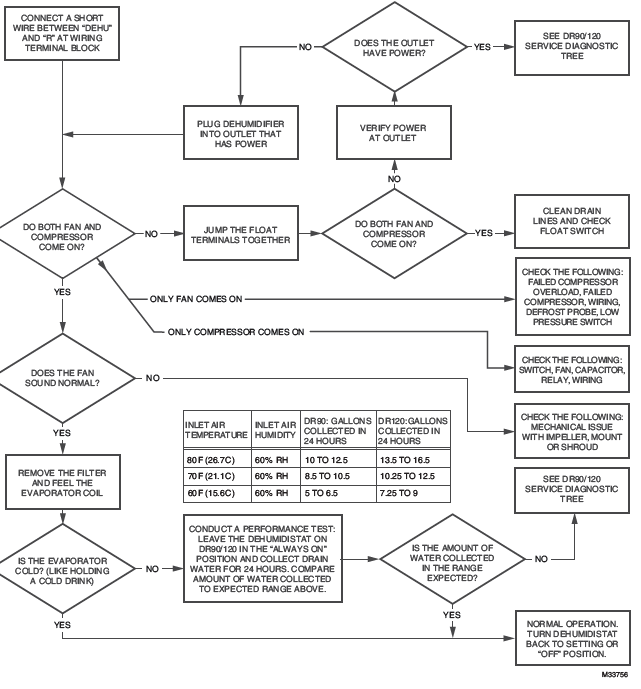
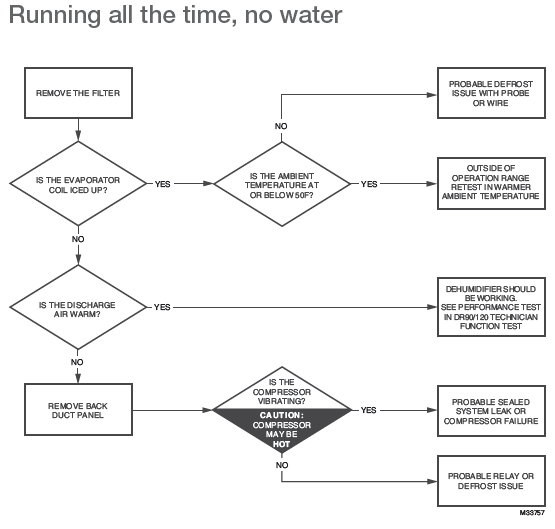
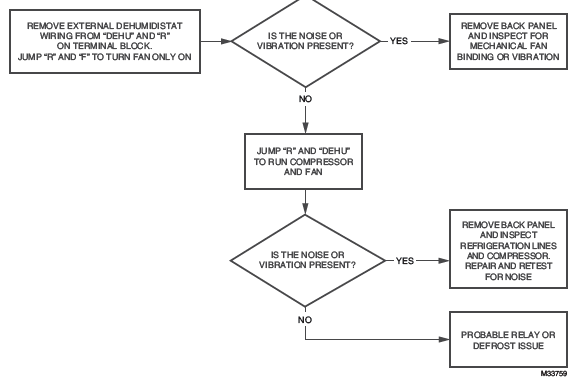
Dehumidifier Runs All The Time, No Water:
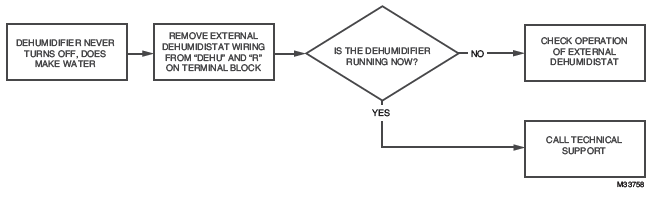
Dehumidifier Runs All The Time , Does Make Water:
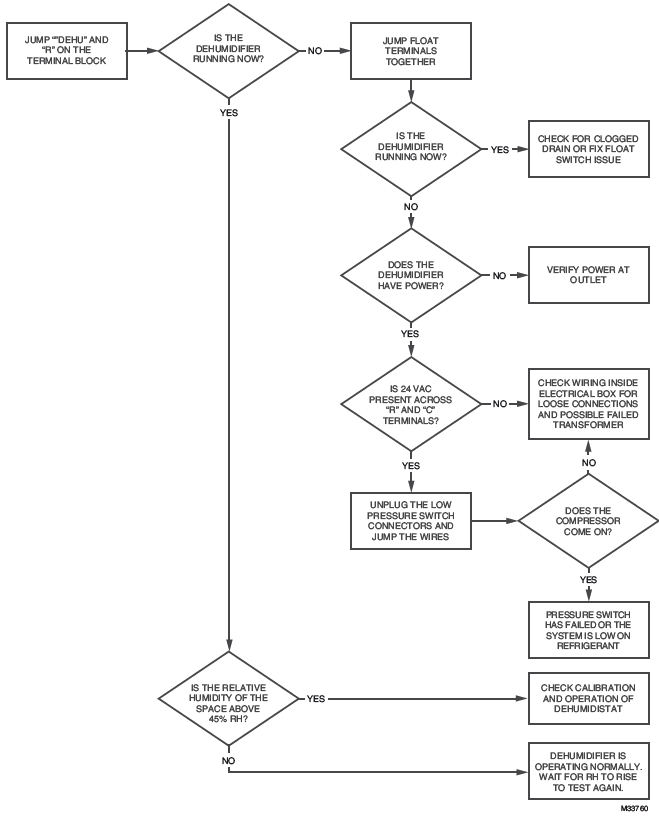
Dehumidifier Not Running At All:
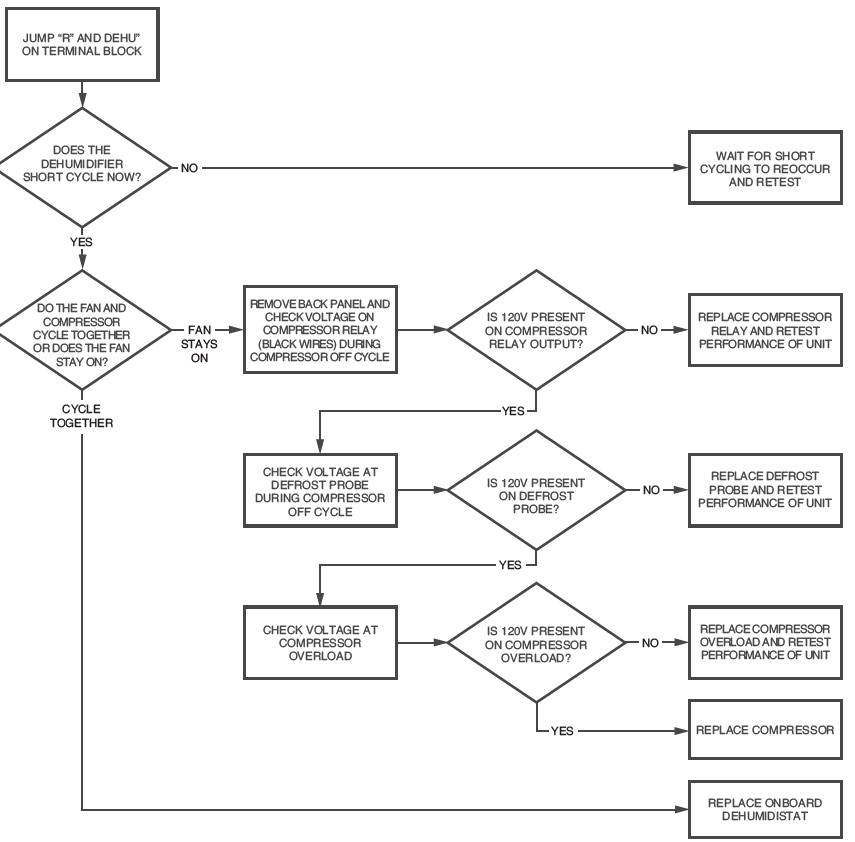
Dehumidifier Short Cycles (Turns off and on a lot):
| Checkout | ||||||||||||||||||||||||||||||||||||||||||||||||||||||||||||||||||||||||||||
|
Apply power to DR90A3000/DR120A3000. Turn the humidity control to a low RH% level to initiate a dehumidification call. Confirm that the DR90A3000/DR120A3000 compressor and fan turn on. If the RF and GF on the DR90A3000/DR120A3000 is wired to the furnace, the furnace fan should also run. This will take up to two minutes. Be sure to turn the control to the desired RH% or to Off when checkout is complete. Clean Filters, and make sure drains are clear and free of debris or sludge. |
| Figure Reference | Base and Accessory Parts | Part Number | |||||||||||||||||||||||||||||||||||||||||||||||||||||||||||||||||||||
| 1 | Dehumidifier | DR90A3000 | |||||||||||||||||||||||||||||||||||||||||||||||||||||||||||||||||||||
| 1 | Dehumidifier | DR120A3000 | |||||||||||||||||||||||||||||||||||||||||||||||||||||||||||||||||||||
| 2 | Motorized Ventilation Damper | EARD6TZ | |||||||||||||||||||||||||||||||||||||||||||||||||||||||||||||||||||||
| 3 | Filter | 50070171-002 | |||||||||||||||||||||||||||||||||||||||||||||||||||||||||||||||||||||


| 5-Year Limited Warranty | ||||||||||||||||||||||||||||||||||||||||||||||||||||||||||||||||||||||||||||
| Resideo warrants this product to be free from defects in workmanship or materials, under normal use and service, for a period of five (5) years from the date of first purchase by the original purchaser. If at any time during the warranty period the product is determined to be defective due to workmanship or materials, Resideo shall repair or replace it (at Resideo’s option). If the product is defective, (i) return it, with a bill of sale or other dated proof of purchase, to the place from which you purchased it; or (ii) call Resideo Customer Care at 1-800-468-1502. Customer Care will make the determination whether the product should be returned to the following address: Resideo Return Goods, 1985 Douglas Dr. N., Golden Valley, MN 55422, or whether a replacement product can be sent to you. This warranty does not cover removal or reinstallation costs. This warranty shall not apply if it is shown by Resideo that the defect was caused by damage which occurred while the product was in the possession of a consumer. Resideo’s sole responsibility shall be to repair or replace the product within the terms stated above. RESIDEO SHALL NOT BE LIABLE FOR ANY LOSS OR DAMAGE OF ANY KIND, INCLUDING ANY INCIDENTAL OR CONSEQUENTIAL DAMAGES RESULTING, DIRECTLY OR INDIRECTLY, FROM ANY BREACH OF ANY WARRANTY, EXPRESS OR IMPLIED, OR ANY OTHER FAILURE OF THIS PRODUCT. Some states do not allow the exclusion or limitation of incidental or consequential damages, so this limitation may not apply to you. THIS WARRANTY IS THE ONLY EXPRESS WARRANTY RESIDEO MAKES ON THIS PRODUCT. THE DURATION OF ANY IMPLIED WARRANTIES, INCLUDING THE WARRANTIES OF MERCHANTABILITY AND FITNESS FOR A PARTICULAR PURPOSE, IS HEREBY LIMITED TO THE FIVE YEAR DURATION OF THIS WARRANTY. Some states do not allow limitations on how long an implied warranty lasts, so the above limitation may not apply to you. This warranty gives you specific legal rights, and you may have other rights which vary from state to state. If you have any questions concerning this warranty, please write Resideo Customer Care, 1985 Douglas Dr, Golden Valley, MN 55422 or call 1-800-468-1502. |

